Integration
Google Analytics 4. See the visits AI sends you.
The Google Analytics 4 integration gives Varf read-only access to your property. Every morning Varf reads your sessions, users and key events, and picks out the visits that come from AI assistants such as ChatGPT, Perplexity, Gemini, Copilot and Claude.
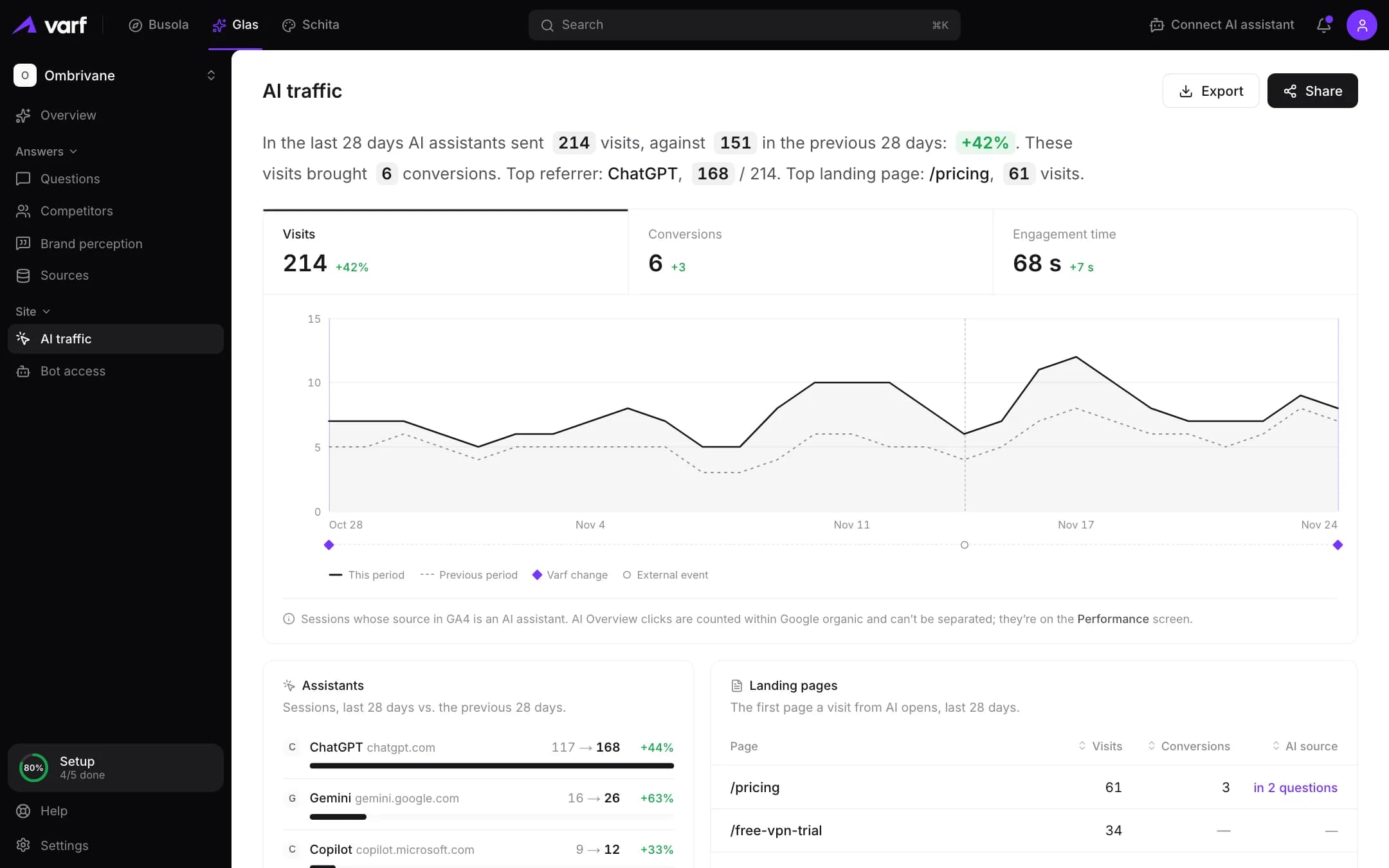
What Varf reads.
The last 28 days against the 28 days before, in your property’s time zone.
- Sessions, users and key events for the whole site.
- Sessions, key events and engagement time from AI assistants, day by day.
- The landing pages AI assistants send visitors to.
- Assistants recognized: ChatGPT, Perplexity, Gemini, Copilot, Claude, DeepSeek, Grok, Meta AI, Mistral, You.com and Phind.
What it powers.
- Glas › AI traffic: how many visits each assistant sends, and whether they convert.
- Next to Glas’ answers, it shows whether being mentioned turns into visits.
Set up in three steps.
- 1
Connect Google
In Settings › Integrations, choose Connect Google Analytics and sign in with a Google account that can read your GA4 property. Allow read-only access. - 2
Pick the property
Choose the GA4 property for your site. - 3
First sync
Varf reads the last 56 days right away, then syncs every morning at 06:15, Türkiye time.
Permissions.
- Scope: analytics.readonly. Varf can’t change your Analytics settings.
- Only admins can connect or disconnect.
- Clicks from Google’s AI Overview arrive as Google organic traffic and can’t be told apart; Glas measures AI Overview mentions directly instead.
Frequently asked questions
Why connect Google Analytics if I have Search Console?
Search Console covers Google search only. Analytics shows visits from everywhere, including AI assistants, and whether those visits convert.
Which AI assistants are recognized?
ChatGPT, Perplexity, Gemini, Copilot, Claude, DeepSeek, Grok, Meta AI, Mistral, You.com and Phind, by their referrer or campaign source.
What are key events?
Key events are the actions you marked as important in GA4, such as a purchase or a sign-up. Varf counts them for AI visits, so you see whether those visits convert.
Does it work with Universal Analytics?
No. Universal Analytics no longer processes data; Varf works with GA4 properties.
Put your site on the loop.
Add your site and connect Search Console. Varf starts collecting right away and shows its first findings as soon as the first sync finishes.